

AI can solve open problems in math and reason about distributed systems, but it can’t use a web browser. This is odd, because most people can’t solve open problems in math but can use a web browser.
There are maybe a dozen “computer use” tools out there that promise to let a coding agent run a computer. These tools give the agent access to mouse actions and screen capture. The agent can only see the screen when it actively uses a screenshot tool. The agent can only move the mouse by inputting precise xy coordinates.
Imagine doing this with a person. I’d sit in my room, take a picture of my computer screen on my phone, then run downstairs. I’d show some the picture to some other guy who’s for some reason locked in this experiment with me, and I’d say ‘QUICK give me the x/y coordinates of this button’ as I frantically point to the like button on instagram on my phone or whatever. And this guy would say something like “idk, my vision isn’t very good because I mostly only know how to read and not much else1 but maybe like 1432x2384?” And then I run back upstairs to my computer and type in those numbers and see the mouse move to what I hope is the right spot, and if its not I’ll do the whole thing over again.
All this to say, computer use agents are mostly incredibly slow and aren’t very good and eat tons of tokens. Neat demos. Not useful for real work.
The gold standard is obviously an AI agent that can use a computer the exact way a human can, so you can automate any task with just a sentence. The next best thing is an AI agent that can sit in the background of a human run browser session, that can take over at any moment in order to manipulate the web page and directly examining network requests. The former isn’t really possible yet. But you can set up the latter with a tool called Playwright.
Playwright is a browser automation tool. It allows you to script interactions with a chrome derived browser. It (and selenium before it) were originally designed for integration testing on the web. They have found new life in the AI era as the primary way we allow agents to use and explore web pages. Because tools like playwright are scriptable, the agent can interact with them through programming languages like Python. No need to take screenshots and manipulate the mouse with coordinates. The agent can interact directly with the HTML.
Playwright and other tools are normally run in the background, without a visible UI. But you can also just run it like Chrome and interact with it like any other web browser. If you spin up playwright through a coding agent session, eg Claude Code, you have a fully functional browser that can be run by an AI agent at any time. Just switch to the terminal tab running Claude Code or whatever and have the agent take over.
Below, a few examples of how I’ve been using playwright for all sorts of browser automation.
Fixing a broken luggage damage claim form from a budget airline on the fly
I recently flew from Paris to NYC on a budget airline. I checked a bag, the airline damaged it, tale as old as time.
Of course this airline doesn’t have any person that you can talk to about this. Instead, they have an online form where you can submit your claim. Credit to the airline, the form mostly works. You can tap out a complaint into a text box and it will submit the complaint. But if you try and attach any photos, say, of the luggage damage, the system just borks. Specifically, the ‘submit’ button remains greyed out and there’s no way to actually upload the supporting files. Probably not intentional.
Since I was running my browser through a Claude Code managed playwright session, I just tabbed over to the terminal and asked Claude to take a look at the page, figure out why the button wasn’t working, and then submit the files. Since Claude had access to the full html, js, console, and network requests, it quickly figured out that:
after each file upload a modal should appear that lets the user set the type of upload;
That modal wasn’t appearing, resulting in the form remaining disabled;
It was possible to simply set the form button as ‘enabled’ and submit the data;
Which it then did. It was even able to validate that the upload went through successfully because it could read the network request statuses.
Automating social media cleanup
A few years ago, after Facebook Messenger added a message unsend feature for what I assume are gdpr compliance reasons, I built a little browser extension called ‘Shoot the Messenger’. It was reasonably popular, with tens of thousands of downloads. The extension would automate your browser, hooking into messenger css selectors to automatically scroll through a messenger thread and sequentially unsend every message in the thread.
This was a nightmare to maintain.
Every time messenger changed their UI, all the css selectors would break. So maybe once a month I’d get a dozen emails and bug reports that the extension wasn’t working right.
With an agent powered playwright, the same functionality is trivial. I can open any messenger thread, tab to the terminal and tell the agent to record my actions, then delete a few messages and tell the agent to do the rest. Since it’s programmatic, I can basically just leave the script on without spending more tokens and go do other things while messenger cleans itself up.
LinkedIn scrapes
LinkedIn is notoriously hard to scrape. They aggressively tamp down on most bot-like behavior. Unfortunately, LinkedIn is also rather difficult to be on as a human. It’s, uh, a lot of AI generated content, to say the least. “Here are five things I learned about entrepreneurship when I stubbed my toe last week.”
Anyway, by this point you probably get the pattern. Spin up LinkedIn through playwright, show the bot what I want it to do, and then go get a coffee while it figures the rest out.
I found all of this compelling enough that I spent last weekend putting it together as a little side open source side project, which you can access here.
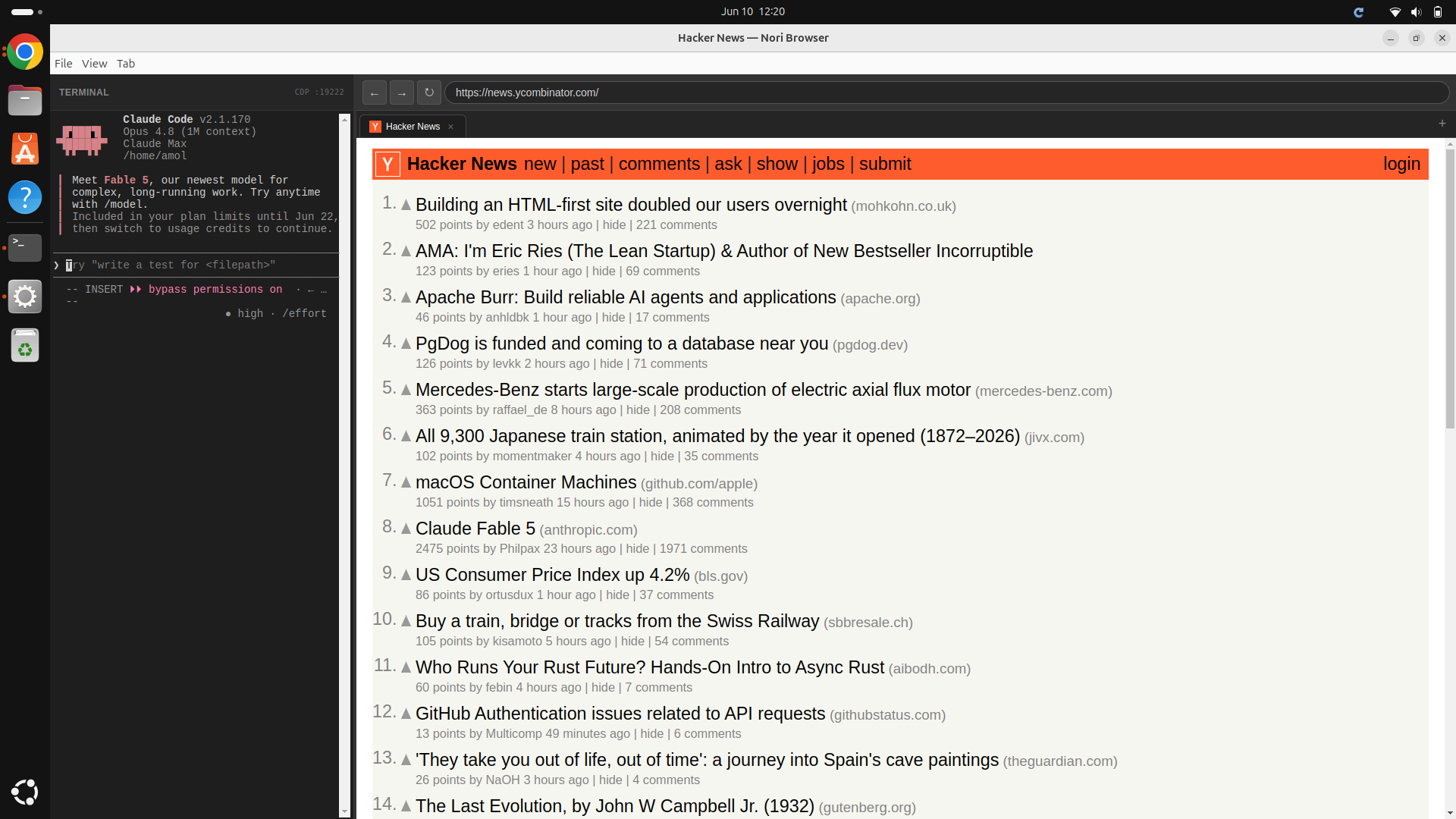
At it’s core, it is just a playwright session on the right and a little Claude Code session on the left. The Claude Code session is given system instructions to understand how to access the playwright session. Everything else is just using the browser like normal…except for when you want to automate something. Just as a silly example, asking the bot to try and find the emails from the folks who had top comments on HN:
Agentics is the study of how to use and reason about agents. If you are an expert in coding agents, or interested in learning more about agents, join our community slack. More articles here. Learn more about Nori at noriagentic.com.
the metaphor is getting away from me
Claude would also be great for writing disposable, bespoke debug visualizations (for anyone still using an IDE). I'm undecided about AI for long-lived code but excited about it for disposable code.